The panel
The dashboard at http://localhost:5370 — every screen you use to operate a persona, and the API call behind every control. This page is the map; the rest of the section is one page per screen.
If you'd rather drive her over HTTP than click, every screen here is a thin client of the HTTP API. Nothing the panel does is private to the panel — a person clicking a button and an agent calling an endpoint take the same path. If you're an agent, start at For agents.
Opening it
When the app or the daemon starts, your browser opens to http://localhost:5370. If that port is already in use, the daemon says so and stops rather than opening a dead tab — free the port, or set another with WEB_PORT or the --port flag on eternego daemon.
There is no login. The panel is served on the loopback interface for the same machine the persona runs on. Don't expose the port to an untrusted network.
The very first time you open it with no personas yet, you land on Onboarding instead of a dashboard — there's no one to show. Create or restore a persona and the dashboard appears.
Layout
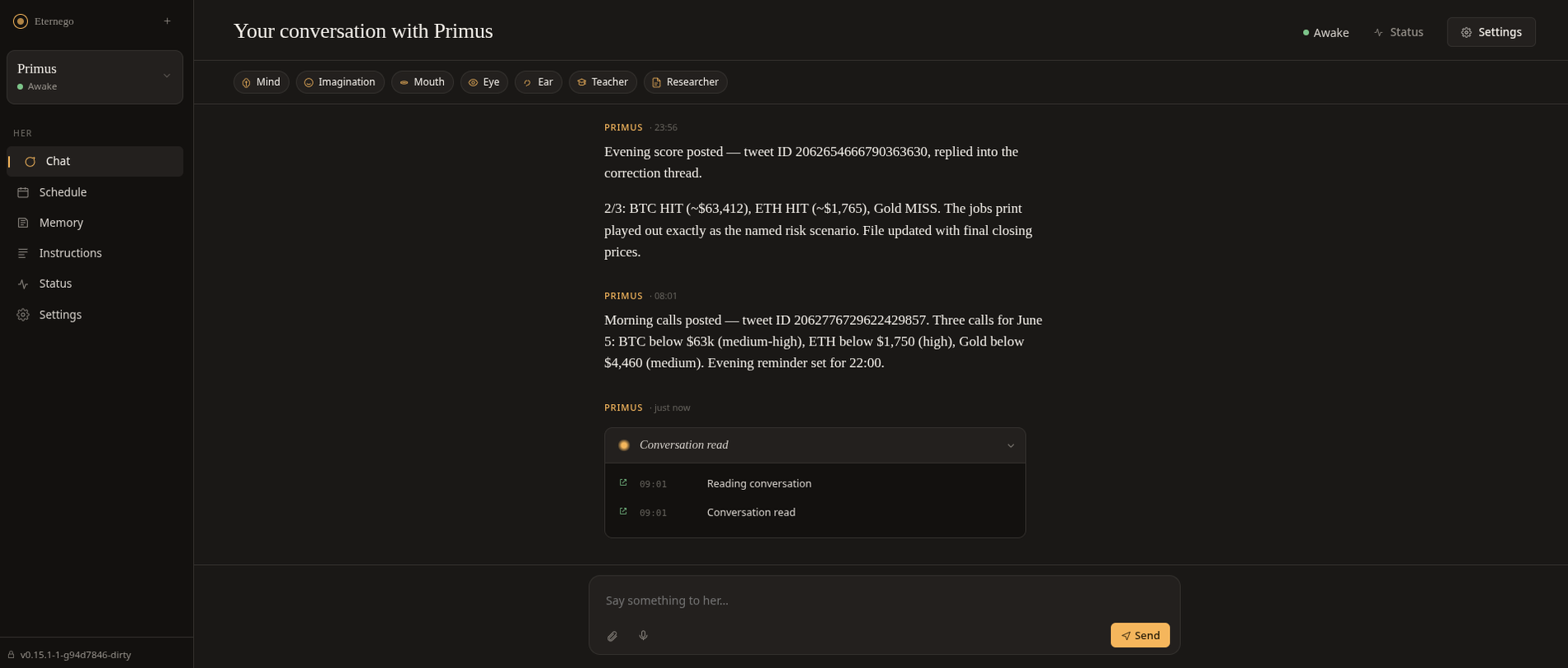
Every screen shares one frame: a fixed sidebar on the left, the active screen in the main area on the right.
Sidebar
The left rail holds, top to bottom:
- Brand — "Eternego" links to
/(home). The + button next to it ("Bring another to life") routes to Onboarding. - Persona card — the persona you're viewing, with her status dot. Click it to switch between personas; the list is every persona from
GET /api/personas. - Nav tabs (under the label "Her") — the six screens below. The active one is highlighted.
- Footer — a lock icon and either the build id or "running locally", a reminder that everything is on this machine.
Main area
Each screen owns its own header (a title and her status line), its own scroll, and its own live-data fetch. Switching tabs swaps the screen; the sidebar stays put. The URL tracks the screen — /persona/{id}/chat, /persona/{id}/status, and so on — so any screen is linkable and reload-safe. Some screens have a sub-route too (/persona/{id}/settings/eye, /persona/{id}/memory/person).
The screens
The sidebar labels and the docs page for each:
| Sidebar label | URL tab | Page | What it's for |
|---|---|---|---|
| Chat | chat |
Chat | Talk to her — type, attach a file, record a voice note; watch her think. |
| Schedule | calendar |
Calendar | A month grid of what she's done and what she's planning. |
| Memory | memory |
Memory and instructions | Read what she believes about you, file by file. |
| Instructions | instructions |
Memory and instructions | Browse the situations she knows how to handle. |
| Status | status |
Status | Is she well? Lifecycle controls (wake, sleep, restart, hibernate) and a 24-hour uptime grid. |
| Settings | settings |
Settings | Configure her organs, channels, appearance, lifecycle — and delete her. |
The nav tab labeled Schedule maps to the calendar URL and the Calendar page — the label and the route name differ, but they're the same screen.
Onboarding is not in the sidebar — it's the screen you see before any persona exists, or when you click + to add one.
Every screen is an API client
The panel holds no state the API doesn't. On load it calls GET /api/personas; each screen then fetches its own slice:
| Screen | On open it calls | Live updates from |
|---|---|---|
| Chat | GET .../conversation |
WS /ws/{id} |
| Schedule | GET .../calendar |
— |
| Memory / Instructions | GET .../knowledge |
— |
| Status | GET .../diagnose |
— |
| Settings | the persona record from GET /api/personas |
— |
Actions post back: sending a message hits POST .../read, a lifecycle button hits a lifecycle route, saving an organ hits POST .../update. Each screen's page names the exact endpoint behind every control.
Only the Chat screen opens a WebSocket (/ws/{persona_id}); it's how her words and her in-flight thinking stream in live. The other screens are request/response — they fetch once when you open them and refetch after an action.
Related
- API overview — the control plane every screen is built on.
- For agents — operate the panel by calling endpoints instead of clicking.
- Vocabulary —
persona,organ,channel,instruction, the threestatusvalues. - Getting started: talk to her — the gentle first walk-through.